My earlier post on Time Machine-esque backups ( http://lastinfinitetentacle.blogspot.com/2009/06/backups-for-lazy.html ) has some useful links for getting regular differential backups going. However, it can be done more neatly, particularly when it come to Windows, and I've come across a nifty solution here http://www.robgolding.com/blog/2009/01/14/leveraging-vss-and-robocopy-for-robust-backups/
This approach requires the vshadow.exe application, which is its own can of worms. Typically, vshadow ships with a/the Windows SDK - ServerFault has some info ( http://serverfault.com/questions/137126/vss-error-521-when-attempting-backup/137254#137254 ) which suggests getting the Vista era SDK (v6.1, from http://www.microsoft.com/downloads/details.aspx?FamilyID=e6e1c3df-a74f-4207-8586-711ebe331cdc&displaylang=en ). You will only need to install the "Win32 Developer Tools" component; you can ignore everything else.
Using VSS (Volume Shadow Service) will allow an internally-consistent copy to be made of a Windows drive. All I then need to do is port the script here ( http://serverfault.com/questions/27397/sync-lvm-snapshots-to-backup-server/168034#168034 ) to Windows. I could use the script to push the image onto the file server, where it can update SVN repository (a physical backup, for bare metal recovery). Handling the (Windows) shadow drive can be achieved using the Windows-native 'dd' from http://www.gmgsystemsinc.com/fau/ . The same dd tool can be used for an 'easy' recovery. If I get this right, it should be Windows native, and easy to install/maintain.
A separate job will pick out user directories for the Time Machine treatment (more of a logical backup, also on my file server, for basic file recovery) via the mercifully short script I previously linked to, thus: http://blog.interlinked.org/tutorials/rsync_time_machine.html
Technically, I could use Zumastor/ddsnap on the file server to get snapshots/revisions, and I still might...
Wednesday, January 05, 2011


Monday, November 22, 2010
MDX for the hard of thinking
That includes me. Between Mondrian's exciting behaviour (at least that of the schema editor) and the vagaries of MDX, I'm finding this OLAP stuff hard to get into. This is a nice rundown on what MDX is. I'm still hoping there's a nifty Mondrian intro I haven't found yet. http://www.databasejournal.com/features/mssql/article.php/10894_1495511_6/MDX-at-First-Glance-Introduction-to-SQL-Server-MDX-Essentials.htm
Monday, October 11, 2010
Movements in the IT world
First shots fired in cyber-war
The security consulting business isn't going anywhere. It's interesting to note that an attack that requires a state-level actor is now a very real possibility in the near term. I remember when you'd have been laughed out of the room for such a suggestion.http://www.theregister.co.uk/2010/10/09/stuxnet_enisa_response/
IT industry consolidation means the first patent-war is on
The first shots have long since gone quiet. It's like the GFC of intellectual property. See this diagram for the current state of mobile-phone/IT/consumer electronics.
http://infobeautiful2.s3.amazonaws.com/whos_suing_whom.png
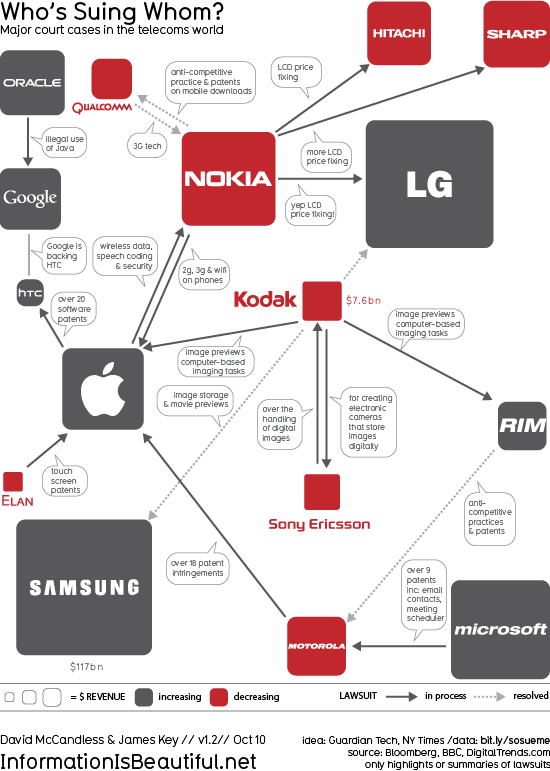
Anyone got some hard data on the consolidation of the IT industry? The merger between consumer technology and IT industries? By revenue? There's rich picking for somone to do the numbers, and make a pretty picture.
Wednesday, June 30, 2010
Virtualisation and Service Oriented Architecture
I was reading over at the TIBCOmmunity site regarding the impact of virtualisation on architecture
( http://www.tibcommunity.com/blogs/soa-architecture/2009/07/24/virtualization-and-its-affect-on-architecture ). There's some handy information here, but it feels a bit lost under a heading of "SOA architecture"; so I thought I'd have a go, under the heading of "I think...".
Virtualisation is the capability to encapsulate arbitrarily complex environments (by adding yet another layer of abstraction, naturally). Virtualisation is a means of utilising commodity hardware in ways that were previously the preserve of esoteric, expensive, proprietary systems.
What does this mean in the context of SOA?
I think the eventual result is that services can/will be built as software appliances. The moves around OSGi are heading in this direction, allowing a more 'focussed' environment to be built. I'll expand on my view of a software appliance life cycle in a later post.
I do believe that the eventual goal around a SOA (at a technical level) should be something like an AMI virtual machine (the lingua franca of the cloud), with defined "production", and management, services. This could/should be hosted in some cloud (public/private), or combination of clouds. The services/VMs may depend on other defined services (provided in a SaaS, or other, manner). Some overarching management environment will be required to manage the relationships between services (and I believe that this is where VMware is heading, fast).
( http://www.tibcommunity.com/blogs/soa-architecture/2009/07/24/virtualization-and-its-affect-on-architecture ). There's some handy information here, but it feels a bit lost under a heading of "SOA architecture"; so I thought I'd have a go, under the heading of "I think...".
Virtualisation is the capability to encapsulate arbitrarily complex environments (by adding yet another layer of abstraction, naturally). Virtualisation is a means of utilising commodity hardware in ways that were previously the preserve of esoteric, expensive, proprietary systems.
What does this mean in the context of SOA?
I think the eventual result is that services can/will be built as software appliances. The moves around OSGi are heading in this direction, allowing a more 'focussed' environment to be built. I'll expand on my view of a software appliance life cycle in a later post.
I do believe that the eventual goal around a SOA (at a technical level) should be something like an AMI virtual machine (the lingua franca of the cloud), with defined "production", and management, services. This could/should be hosted in some cloud (public/private), or combination of clouds. The services/VMs may depend on other defined services (provided in a SaaS, or other, manner). Some overarching management environment will be required to manage the relationships between services (and I believe that this is where VMware is heading, fast).
Tuesday, June 23, 2009
Backups for the lazy
I'm lazy. I like backups because then I don't have to do the same thing twice. TimeMachine is such a nice idea I want one; and here it is:
Sweet, sweet lifehacker.
http://lifehacker.com/software/backup/mimic-time-machine-with-rsync-322766.php
http://blog.interlinked.org/tutorials/rsync_time_machine.html
http://users.softlab.ece.ntua.gr/~ttsiod/backup.html
Sweet, sweet lifehacker.
http://lifehacker.com/software/backup/mimic-time-machine-with-rsync-322766.php
http://blog.interlinked.org/tutorials/rsync_time_machine.html
http://users.softlab.ece.ntua.gr/~ttsiod/backup.html
Wednesday, October 15, 2008
Gold!
A readable, recent blog on big JVM heaps... They're bad, naughty, offer rubbish performance, but they're hard to dodge.
http://andrigoss.blogspot.com/2008/02/jvm-performance-tuning.html
Certainly, it's better than this effort from Tangosol/Coherence/Oracle ("Use our product!"). As it happens, I need to sort this for a badly built product based on Coherence... Oh! The pain!
http://andrigoss.blogspot.com/2008/02/jvm-performance-tuning.html
Certainly, it's better than this effort from Tangosol/Coherence/Oracle ("Use our product!"). As it happens, I need to sort this for a badly built product based on Coherence... Oh! The pain!
Friday, June 06, 2008
Vista and VMWare network irritation
I've been working with VMWare a bit recently, on my machines. As both the machines I use are relatively new, they came with Vista. Vista has been irritating, but less so than a downgrade.
Vista wants to describe and categorize all the network interfaces. Unfortunately, that includes the virtual network adapters that VMWare sets up (and probably the same for Windows qemu users fiddling with openvpn for its TAP implementation); and it gets its knickers in a twist because they don't seem to lead anywhere. The solution for Vista (pre-SP1) was to take advantage of a bug and add bogus default gateways to the virtual interfaces. The solution for Vista SP1 is more involved, but at least seems more "proper".
Essentially, you need to hack the Windows registry and tell Vista that these interfaces aren't leading anywhere. This seems a bit odd, as there may be an extensive network infrastructure of VMs; but that's it.
Use the registry editor of your choice and follow this:
http://communities.vmware.com/message/916766#916766
Vista wants to describe and categorize all the network interfaces. Unfortunately, that includes the virtual network adapters that VMWare sets up (and probably the same for Windows qemu users fiddling with openvpn for its TAP implementation); and it gets its knickers in a twist because they don't seem to lead anywhere. The solution for Vista (pre-SP1) was to take advantage of a bug and add bogus default gateways to the virtual interfaces. The solution for Vista SP1 is more involved, but at least seems more "proper".
Essentially, you need to hack the Windows registry and tell Vista that these interfaces aren't leading anywhere. This seems a bit odd, as there may be an extensive network infrastructure of VMs; but that's it.
Use the registry editor of your choice and follow this:
http://communities.vmware.com/message/916766#916766
Wednesday, April 30, 2008
Thursday, April 24, 2008
Quick product review
I got a new laptop recently, an M1330 from Dell. I'd thought I throw out a few quick comments on the process.
Up to the minute technology says that the Penryn family of processors are excellent for laptops, with The Register suggesting that, alone, they can increase battery life significantly. In terms of graphics, the world of little laptops revolves around Intel's X3100 or nVidia's 8400M. The M1330 can have either - I went for the nVidia option as I like playing games now and again.
That left a choice of screen. I plumped for the more expensive OLED option after The Register's review. I noted that Dell seems to have responded to the review by raising the price of this option. RAM - 4GB (I could have saved £50 and blown my warranty by adding this myself, but out of £1000, why?). Hard disk - 250GB (it's enough for me).
The laptop runs nicely. Vista's a dog, but it's Vista. The graphics performance is better than I expected (TF2 runs well, except for the water effects). And the number crunching power is all I'd hoped for.
I tried Ubuntu 7.10 for a bit, and it ran well, but I hit issues with wireless networking and my home network, so restored Vista. I may try again once the new release settles back down. I have no love for Vista.
In a nutshell:
Dell M1330 8/10 - Solid.
Microsoft Vista 3/10 - Soft.
Up to the minute technology says that the Penryn family of processors are excellent for laptops, with The Register suggesting that, alone, they can increase battery life significantly. In terms of graphics, the world of little laptops revolves around Intel's X3100 or nVidia's 8400M. The M1330 can have either - I went for the nVidia option as I like playing games now and again.
That left a choice of screen. I plumped for the more expensive OLED option after The Register's review. I noted that Dell seems to have responded to the review by raising the price of this option. RAM - 4GB (I could have saved £50 and blown my warranty by adding this myself, but out of £1000, why?). Hard disk - 250GB (it's enough for me).
The laptop runs nicely. Vista's a dog, but it's Vista. The graphics performance is better than I expected (TF2 runs well, except for the water effects). And the number crunching power is all I'd hoped for.
I tried Ubuntu 7.10 for a bit, and it ran well, but I hit issues with wireless networking and my home network, so restored Vista. I may try again once the new release settles back down. I have no love for Vista.
In a nutshell:
Dell M1330 8/10 - Solid.
Microsoft Vista 3/10 - Soft.
Friday, April 18, 2008
USB dead device fix
I have a slug (NSLU2) at home, serving out a big USB hard disk. I like my slug. It's small, and it runs Debian, and so long as I remember that it's really small, it runs really well.
It looks like USB drives suffer from lots of issues with dodgey firmware and drivers. Certainly, I haven't escaped them. Every few months I lose the USB drive:
kern.log:
...
This can cause filesystem corruption as well, and is generally "A Bad Thing". Fixing this issue is (for me) a case of remounting the filesystem. I recall once I also had to cycle the power too. Fortunately, I found this page: http://www.mail-archive.com/linux-usb-users@lists.sourceforge.net/msg16510.html which has a very nifty technique for coaxing the USB stack back to life.
I've written a script to pull out the sysfs name of the USB device for a given mount point. At some point I'll add this in to my slug so that it "just works". That just leaves a log scraper to pick up each mount and get the sysfs name, wait for a failure, unmount the dead file system, rebind the USB device, check the file system for damage, and remount the filesystem. Easy!
It looks like USB drives suffer from lots of issues with dodgey firmware and drivers. Certainly, I haven't escaped them. Every few months I lose the USB drive:
kern.log:
Apr 12 20:32:54 slug kernel: scsi 1:0:0:0: rejecting I/O to dead device
...
This can cause filesystem corruption as well, and is generally "A Bad Thing". Fixing this issue is (for me) a case of remounting the filesystem. I recall once I also had to cycle the power too. Fortunately, I found this page: http://www.mail-archive.com/linux-usb-users@lists.sourceforge.net/msg16510.html which has a very nifty technique for coaxing the USB stack back to life.
I've written a script to pull out the sysfs name of the USB device for a given mount point. At some point I'll add this in to my slug so that it "just works". That just leaves a log scraper to pick up each mount and get the sysfs name, wait for a failure, unmount the dead file system, rebind the USB device, check the file system for damage, and remount the filesystem. Easy!
#!/bin/bash
# get_usb_name.sh
# e.g.: ./get_usb_name.sh /media/usb2

USB_DEV=$(mount | grep ${1} | cut -f 1 -d ' ' | sed -e 's/[0-9]$//' -e 's(^/dev/((')
USB_ADDR=$(ls -l /sys/block/${USB_DEV}/device | sed -e 's(/host.*$((' -e 's(^.*/((')
if [ -e /sys/bus/usb/drivers/usb-storage/${USB_ADDR} ]
then
echo $USB_ADDR
else
echo "could not verify usb address of ${USB_ADDR} for device ${USB_DEV}" >&2
fi
Subscribe to:
Posts (Atom)